Parkometer AR
Always know how much time is remaining on your parking meter.
And its easy!
Start application, enter the parking meter time and you are ready to go.
★
★
★
★
★ As featured in the Computer BILD (7/12) magazine
★
★
★
★
★
Features include:
✔ Augmented Reality View / Map / Compass to find your way back
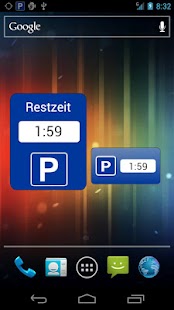
✔ Parking Disc Widget showing remaining time
✔ Numerical display of distance and remaining time
✔ Arrow showing direction to car
✔ Parking timer with alarm functionality
✔ Add photos and notes (e.g.
Parkdeck 3, Row 2) to remember where your car was parked
✔ Turn by turn directions to find the way back
✔ Automatically saves parking position when disconnected from car (optional)
✔ Configurable map layers
✔ Input of parking duration either as remaining time (e.g.
2 hours - good for parking discs) or by specifying the exact point in time (e.g.
at 12:34 pm - good for parkometers)
✔ Available in english, german, french, spanish, chinese, japanese and korean
✔ History and favorites for parking positions
✔ Share your parking position via e.g.
Google+, Facebook, Twitter, SMS, E-Mail, Evernote, WhatsApp etc.
✔ Supports metric (meters) and imperial (miles) units
✔ Sophisticated energy saving algorithms to not drain your devices battery
Quick Users Manual:
When you have parked your car open Parkometer AR.
The app will automatically start to locate your position.
If you are inside a park house, parkade or parking garage (where a GPS signal is not available) Parkometer AR will search your position in the background and will take the first valid position fix once you leave the building.
If you are using a parking meter or a parking disc you can enter how long you are planning to park your car.
Parkometer AR will track the time and notifies you with an alarm when it is time to return to your car.
Thereby you can forget about time and concentrate solely on your shopping or other business.
When you want to return to your car Parkometer AR will assist you in many different ways to find the way back to your car.
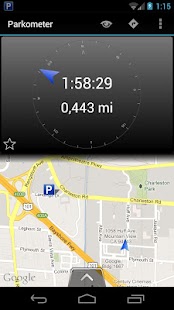
In the main view you see a compass in the upper part and a map in the lower part.
The blue arrow in the compass area points in the direction of your car.
In the center of the compass you see the remaining parking time and the distance to your car.
The map shows the position of your car (blue parking sign) and your position (blue arrow).
The blue arrow in the map points in the direction you are facing (meaning the direction you are pointing your device at).
The map display adjusts automatically, so that both positions are always within the view.
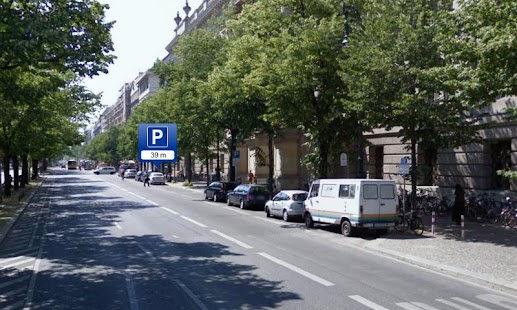
You can also switch to the Augmented Reality (AR) view.
This will project the position of your car inside the camera display.
Hold the device as if you would take a shot of the street.
On the display you will see an arrow, which shows you in what direction you should point the device.
If you do so you, a parking symbol will appear, showing the exact position of the car and the distance.
Follow this parking symbol and you will reach your car.
But wait, there is more :) Parkometer AR lets you also use your favorite navigation software to guide you back to your car.
Just press the shortcut icon in the main view and Parkometer AR transfers all necessary coordinates to your navigation program.
With this 3 options Parkometer AR is a versatile car locator and lets you choose your favorite method.
Parkometer AR allows you to install so called Homescreen Widgets on the desktop of your device.
These will show you the remaining parking time and provide instant access to the application.
This was only a brief introduction, showing you only the basics of the application.
Experiment and find out what else Parkometer AR has to offer.
There are quite a few things to discover...
Have fun!!!
Translation: Please send suggestions for better translations to [email protected].
About Parkometer AR
- Package name (App ID)
- de.janschoppenhorst.parkometer
- Available on
- Google Play
- Price
- Free
- Version
- v2.4.9-Google
- Developer
- Sam Lu
Looking for the Parkometer AR APK?
The safest way to get Parkometer AR (de.janschoppenhorst.parkometer) on your Android device is to install it directly from Google Play — you'll always get the latest official version, automatic updates, and no risk of modified or infected APK files from third-party sites.
Social Features
Connect and share with friends and the community.
Gaming Features
Enjoy immersive gaming experience with various game modes.
Camera Features
Advanced camera features with editing capabilities.
See Parkometer AR in Action
Frequently Asked Questions
Is Parkometer AR free?
Yes, Parkometer AR is free to download and install on Android through Google Play.
How do I install Parkometer AR on Android?
Open Google Play on your Android phone or tablet, search for Parkometer AR by Sam Lu or tap the Google Play button on this page, then tap Install. The app downloads and installs automatically.
What is de.janschoppenhorst.parkometer?
de.janschoppenhorst.parkometer is the App ID (package name) of Parkometer AR on Google Play. Every Android app has a unique package name, and it is the safest way to verify you are installing the official app.
Is Parkometer AR safe to download?
Installing Parkometer AR from Google Play is the safest option: you get the official version published by Sam Lu, verified by Google Play Protect, with automatic updates. Avoid APK files from unofficial third-party sites.

Get Parkometer AR Today
Parkometer AR for Android — free download on Google Play.
Compatible with Android phones and tablets — available on Google Play.
Ask AI about this app
Get instant answers about features, tips and more from popular AI assistants.